FORALL

FORALL concept help us reducing the Iterations between PL/SQL Block and SQL Engine.

Note:- When ever, we excute any DML (INSERT or UPDATE or DELETE) Operations in the PL/SQL block then, It will move from PL/SQL Block to SQL Engine to excute the DML Operation in SQL Engine.

If we have some LOOP and it is looping for 100 times then, this will iterate from 100 times from PL/SQL block to SQL Engine.

Example:-

CREATE TABLE emp_by_dept AS SELECT employee_id, department_id
FROM employees WHERE 1 = 0;
DECLARE
TYPE dept_tab IS TABLE OF departments.department_id%TYPE;
deptnums dept_tab;
TYPE NumList IS TABLE OF NUMBER;
-- The zeros in this list will cause divide-by-zero errors.
num_tab NumList := NumList(10,0,11,12,30,0,20,199,2,0,9,1);
errors NUMBER;
dml_errors EXCEPTION;
PRAGMA exception_init(dml_errors, -24381);
BEGIN
SELECT department_id BULK COLLECT INTO deptnums FROM departments;
-- SAVE EXCEPTIONS means don't stop if some INSERT fail.
FORALL i IN 1..deptnums.COUNT SAVE EXCEPTIONS
INSERT INTO emp_by_dept
SELECT employee_id, department_id FROM employees
WHERE department_id = deptnums(i);
FOR i IN 1..deptnums.COUNT LOOP
-- Count how many rows were inserted for each department; that is,
-- how many employees are in each department.
dbms_output.put_line('Dept '||deptnums(i)||': inserted '||
SQL%BULK_ROWCOUNT(i)||' records');
END LOOP;
dbms_output.put_line('Total records inserted =' || SQL%ROWCOUNT);
-- If any errors occurred during the FORALL SAVE EXCEPTIONS,
-- a single exception is raised when the statement completes.
EXCEPTION
WHEN dml_errors THEN -- Now we figure out what failed and why.
errors := SQL%BULK_EXCEPTIONS.COUNT;
dbms_output.put_line('Number of INSERT statements that failed: ' || errors);
FOR i IN 1..errors LOOP
dbms_output.put_line('Error #' || i || ' occurred during '||
'iteration #' || SQL%BULK_EXCEPTIONS(i).ERROR_INDEX);
dbms_output.put_line('Error message is ' ||
SQLERRM(-SQL%BULK_EXCEPTIONS(i).ERROR_CODE));
END LOOP;
END;

Exception Handling in Oracle

In this section we will discuss about the following,
1) What is Exception Handling.
2) Structure of Exception Handling.
3) Types of Exception Handling.

1) What is Exception Handling?

PL/SQL provides a feature to handle the Exceptions which occur in a PL/SQL Block known as exception Handling. Using Exception Handling we can test the code and avoid it from exiting abruptly. When an exception occurs a messages which explains its cause is recieved.
PL/SQL Exception message consists of three parts.
1) Type of Exception
2) An Error Code
3) A message

By Handling the exceptions we can ensure a PL/SQL block does not exit abruptly.

2) Structure of Exception Handling.

The General Syntax for coding the exception section
 DECLARE
   Declaration section 
 BEGIN 
   Exception section 
 EXCEPTION 
 WHEN ex_name1 THEN 
    -Error handling statements 
 WHEN ex_name2 THEN 
    -Error handling statements 
 WHEN Others THEN 
   -Error handling statements 
END; 
General PL/SQL statments can be used in the Exception Block.
When an exception is raised, Oracle searches for an appropriate exception handler in the exception section. For example in the above example, if the error raised is 'ex_name1 ', then the error is handled according to the statements under it. Since, it is not possible to determine all the possible runtime errors during testing fo the code, the 'WHEN Others' exception is used to manage the exceptions that are not explicitly handled. Only one exception can be raised in a Block and the control does not return to the Execution Section after the error is handled.
If there are nested PL/SQL blocks like this.
 DELCARE
   Declaration section 
 BEGIN
    DECLARE
      Declaration section 
    BEGIN 
      Execution section 
    EXCEPTION 
      Exception section 
    END; 
 EXCEPTION
   Exception section 
 END; 
In the above case, if the exception is raised in the inner block it should be handled in the exception block of the inner PL/SQL block else the control moves to the Exception block of the next upper PL/SQL Block. If none of the blocks handle the exception the program ends abruptly with an error.

3) Types of Exception.

There are 3 types of Exceptions.
a) Named System Exceptions
b) Unnamed System Exceptions
c) User-defined Exceptions

a) Named System Exceptions

System exceptions are automatically raised by Oracle, when a program violates a RDBMS rule. There are some system exceptions which are raised frequently, so they are pre-defined and given a name in Oracle which are known as Named System Exceptions.
For example: NO_DATA_FOUND and ZERO_DIVIDE are called Named System exceptions.
Named system exceptions are:
1) Not Declared explicitly,
2) Raised implicitly when a predefined Oracle error occurs,
3) caught by referencing the standard name within an exception-handling routine.
Exception Name
Reason
Error Number
CURSOR_ALREADY_OPEN
When you open a cursor that is already open.
ORA-06511
INVALID_CURSOR
When you perform an invalid operation on a cursor like closing a cursor, fetch data from a cursor that is not opened.
ORA-01001
NO_DATA_FOUND
When a SELECT...INTO clause does not return any row from a table.
ORA-01403
TOO_MANY_ROWS
When you SELECT or fetch more than one row into a record or variable.
ORA-01422
ZERO_DIVIDE
When you attempt to divide a number by zero.
ORA-01476
For Example: Suppose a NO_DATA_FOUND exception is raised in a proc, we can write a code to handle the exception as given below.
BEGIN 
  Execution section
EXCEPTION 
WHEN NO_DATA_FOUND THEN 
 dbms_output.put_line ('A SELECT...INTO did not return any row.'); 
 END; 

b) Unnamed System Exceptions

Those system exception for which oracle does not provide a name is known as unamed system exception. These exception do not occur frequently. These Exceptions have a code and an associated message.
There are two ways to handle unnamed sysyem exceptions:
1. By using the WHEN OTHERS exception handler, or
2. By associating the exception code to a name and using it as a named exception.
We can assign a name to unnamed system exceptions using a Pragma called EXCEPTION_INIT.
EXCEPTION_INIT will associate a predefined Oracle error number to a programmer_defined exception name.
Steps to be followed to use unnamed system exceptions are
• They are raised implicitly.
• If they are not handled in WHEN Others they must be handled explicity.
• To handle the exception explicity, they must be declared using Pragma EXCEPTION_INIT as given above and handled referecing the user-defined exception name in the exception section.
The general syntax to declare unnamed system exception using EXCEPTION_INIT is:
DECLARE 
   exception_name EXCEPTION; 
   PRAGMA 
   EXCEPTION_INIT (exception_name, Err_code); 
BEGIN 
Execution section
EXCEPTION
  WHEN exception_name THEN
     handle the exception
END;
For Example: Lets consider the product table and order_items table from sql joins.
Here product_id is a primary key in product table and a foreign key in order_items table.
If we try to delete a product_id from the product table when it has child records in order_id table an exception will be thrown with oracle code number -2292.
We can provide a name to this exception and handle it in the exception section as given below.
 DECLARE 
  Child_rec_exception EXCEPTION; 
  PRAGMA 
   EXCEPTION_INIT (Child_rec_exception, -2292); 
BEGIN 
  Delete FROM product where product_id= 104; 
EXCEPTION 
   WHEN Child_rec_exception 
   THEN Dbms_output.put_line('Child records are present for this product_id.'); 
END; 
/ 

c) User-defined Exceptions

Apart from sytem exceptions we can explicity define exceptions based on business rules. These are known as user-defined exceptions.
Steps to be followed to use user-defined exceptions:
• They should be explicitly declared in the declaration section.
• They should be explicitly raised in the Execution Section.
• They should be handled by referencing the user-defined exception name in the exception section.
For Example: Lets consider the product table and order_items table from sql joins to explain user-defined exception.
Lets create a business rule that if the total no of units of any particular product sold is more than 20, then it is a huge quantity and a special discount should be provided.
DECLARE 
  huge_quantity EXCEPTION; 
  CURSOR product_quantity is 
  SELECT p.product_name as name, sum(o.total_units) as units
  FROM order_tems o, product p
  WHERE o.product_id = p.product_id; 
  quantity order_tems.total_units%type; 
  up_limit CONSTANT order_tems.total_units%type := 20; 
  message VARCHAR2(50); 
BEGIN 
  FOR product_rec in product_quantity LOOP 
    quantity := product_rec.units;
     IF quantity > up_limit THEN 
      message := 'The number of units of product ' || product_rec.name ||  
                 ' is more than 20. Special discounts should be provided. 
                Rest of the records are skipped. '
     RAISE huge_quantity; 
     ELSIF quantity < up_limit THEN 
      v_message:= 'The number of unit is below the discount limit.'; 
     END IF; 
     dbms_output.put_line (message); 
  END LOOP; 
 EXCEPTION 
   WHEN huge_quantity THEN 
     dbms_output.put_line (message); 
 END; 
/ 

RAISE_APPLICATION_ERROR ( )

RAISE_APPLICATION_ERROR is a built-in procedure in oracle which is used to display the user-defined error messages along with the error number whose range is in between -20000 and -20999.
Whenever a message is displayed using RAISE_APPLICATION_ERROR, all previous transactions which are not committed within the PL/SQL Block are rolled back automatically (i.e. change due to INSERT, UPDATE, or DELETE statements).
RAISE_APPLICATION_ERROR raises an exception but does not handle it.
RAISE_APPLICATION_ERROR is used for the following reasons,
a) to create a unique id for an user-defined exception.
b) to make the user-defined exception look like an Oracle error.
The General Syntax to use this procedure is:
RAISE_APPLICATION_ERROR (error_number, error_message); 

• The Error number must be between -20000 and -20999
• The Error_message is the message you want to display when the error occurs.
Steps to be folowed to use RAISE_APPLICATION_ERROR procedure:
1. Declare a user-defined exception in the declaration section.
2. Raise the user-defined exception based on a specific business rule in the execution section.
3. Finally, catch the exception and link the exception to a user-defined error number in RAISE_APPLICATION_ERROR.
Using the below example we can display a error message using RAISE_APPLICATION_ERROR.
DECLARE
  huge_quantity EXCEPTION; 
  CURSOR product_quantity is 
  SELECT p.product_name as name, sum(o.total_units) as units
  FROM order_tems o, product p
  WHERE o.product_id = p.product_id; 
  quantity order_tems.total_units%type; 
  up_limit CONSTANT order_tems.total_units%type := 20; 
  message VARCHAR2(50); 
BEGIN 
  FOR product_rec in product_quantity LOOP 
    quantity := product_rec.units;
     IF quantity > up_limit THEN 
        RAISE huge_quantity; 
     ELSIF quantity < up_limit THEN 
      v_message:= 'The number of unit is below the discount limit.'; 
     END IF; 
     Dbms_output.put_line (message); 
  END LOOP; 
 EXCEPTION 
   WHEN huge_quantity THEN 
        raise_application_error(-2100, 'The number of unit is above the discount limit.');
END; 
/  

Oracle Order Management DropShip Flow for R12

What is Dropship Order - In dropship Order, sales order line creates a requisition line that becomes a PO and sent to your supplier. You instruct your supplier to send the item or configured item directly to your customer only and items never physically pass through your warehouse, and therefore you do not pick, pack or ship them yourselves.

R12 Dataflow of Dropship order from OM to Oracle Payables.
Topics covered in this blog are
Drop Ship Sales order creation and booking.
Requisition Import
Auto Creation of PO
Receipt against PO
AP against PO

Since in Dropship we don’t receive the goods in our warehouse, SOURCE_TYPE will be “External”, where as for non-dropship orders it is Internal. Once Book, we cannot Changes SOURCE_TYPE.

We can change the SOURCE_TYPE as “External” for an item at the time of order creation, or we can define it permanently in the Item creation Setup, by setting Default SO Source Type = External.

Also as we don’t have any shipping activity in dropship orders, Receiving Transaction Processor (RTP) , triggered after Submitting the receipt will push the workflow from Shipping activity to Fulfillment.
R12 Dataflow of Dropship order from OM to Oracle Payables.
Step1 - Drop ship Sales Order Creation
Step2 - Source Type = External
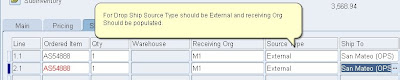

Step3 -Once order is Book, order line workflow will be at Purchase release Deferred Status .

Step4 -Submit Workflow to progress the Order line workflow.



Step5 -Submit the requisition Import to create Requisition for Drop Ship
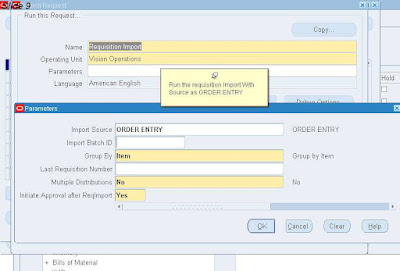

Step6 -Once requisition Import Completed successfully , Navigate to Order lines Action >Additional Information and then go to DropShip tab.
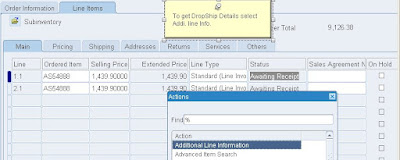
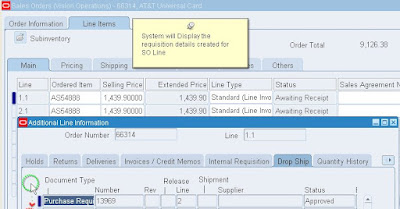


Step7 - Switch to Purchasing Responsibility and Navigate to Requisition Summary



Step8 -Query for Requisition Number


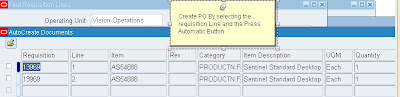
Step9 – Open the Auto Create Window and Query for Requisition #
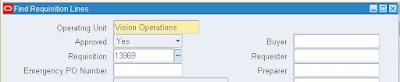


Step9 –Auto Create


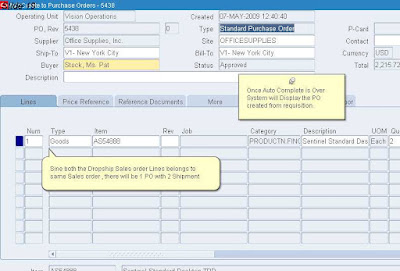
Step10 -Approve the PO


Step11 - Browse the Shipment Details of PO , (Shipment Button)
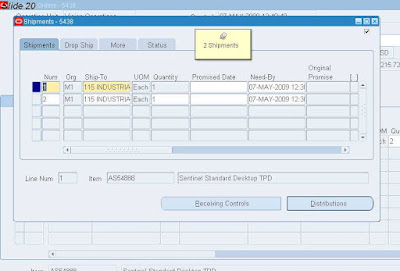


Step11 - Browse the Shipment Details of PO, (Shipment Button).We can select the Approval Level and Invoice Match Option based on your business requirements.
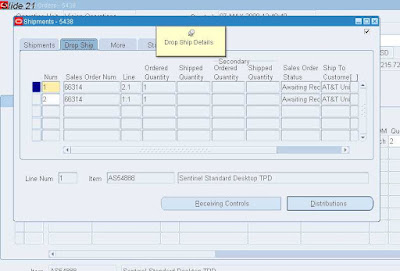


Step11 - Browse the Shipment Details of PO , (Shipment button).
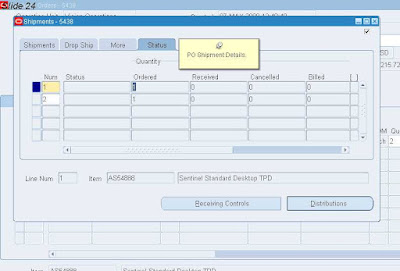

Step11 - Browse the Shipment Details of PO , (Shipment Button), it will display Qty Ordered/billed/shipped etc.
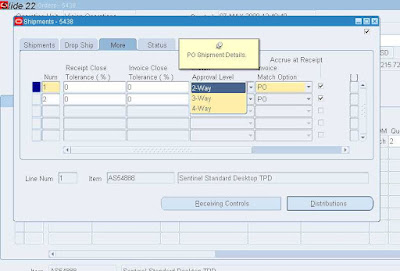
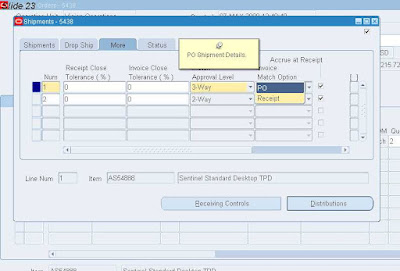


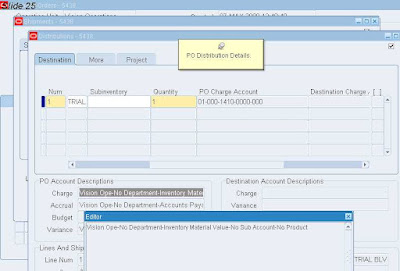
Step12 - Browse the Distribution Details of PO , (Distribution Button).
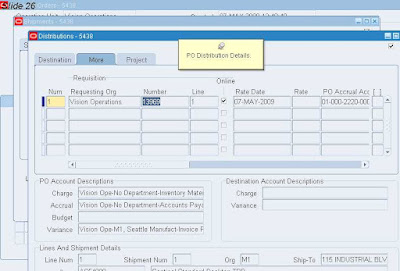


Step13 - Navigate to receipts.


Step13 - Navigate to Receipt , system will prompt for Inventory Org , Select your Inventory Organization.

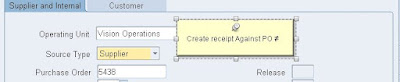
Step14 - Enter Receipt against PO.


Step14 -
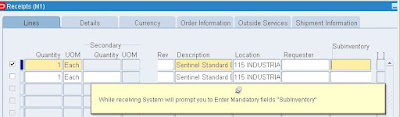
Step14 -
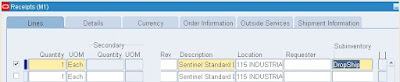

Step15 - Once you save the Receipt , System will submit Receiving Transaction processor.



Step16 - RTP on successful completion Progress the OM Workflow and Line status change from Awaiting receipt to SHIPPED.


 Some queries involved in O2C

Select  count(*)
from OE_ORDER_HEADERS_ALL          ORD,
OE_TRANSACTION_TYPES_TL       TYP,
FND_LANGUAGES                 FLA
where TYP.LANGUAGE                  = FLA.LANGUAGE_CODE
and  ORD.ORDER_TYPE_ID             = TYP.TRANSACTION_TYPE_ID;

select count(*)
from OE_ORDER_LINES_ALL                LIN,
MTL_SYSTEM_ITEMS              ITM
where LIN.SHIP_FROM_ORG_ID           = ITM.ORGANIZATION_ID
and  LIN.INVENTORY_ITEM_ID          = ITM.INVENTORY_ITEM_ID;

select COUNT(*)
from OE_SETS                       ST1,
OE_LINE_SETS                  LST
where ST1.SET_ID              = LST.SET_ID;

select COUNT(*)
from OE_ORDER_HEADERS                  ORD,
MTL_PARAMETERS                    PAR,
OE_TRANSACTION_TYPES_V            TYP,
AR_CUSTOMERS                      CUS,
OE_SHIP_TO_ORGS_V                 SHP,
QP_LIST_HEADERS_V                 PRC
where ORD.SHIP_FROM_ORG_ID          = PAR.ORGANIZATION_ID
and  ORD.ORDER_TYPE_ID             = TYP.TRANSACTION_TYPE_ID
and  SHP.SITE_USE_ID               = ORD.SHIP_TO_ORG_ID
and  ORD.SOLD_TO_ORG_ID            = CUS.CUSTOMER_ID
and  ORD.PRICE_LIST_ID             = PRC.LIST_HEADER_ID;

SELECT   COUNT(*)
from OE_ORDER_HOLDS_ALL    HLD,
OE_HOLD_SOURCES_ALL   HSR,
OE_HOLD_DEFINITIONS   HDF,
OE_HOLD_RELEASES      HRL
where   HLD.HOLD_SOURCE_ID       = HSR.HOLD_SOURCE_ID
and  HSR.HOLD_ID         = HDF.HOLD_ID
and  HLD.HOLD_RELEASE_ID = HRL.HOLD_RELEASE_ID;

select COUNT(*)
from oe_processing_msgs_vl     MSG,
oe_processing_msgs_tl     MST,
fnd_languages             FLA
where  msg.transaction_id = mst.transaction_id
and     MST.LANGUAGE       = FLA.LANGUAGE_CODE;

select  COUNT(*)
from MTL_SALES_ORDERS              MSO,
OE_ORDER_HEADERS              ORD,
OE_TRANSACTION_TYPES_VL       TYP
where ORD.ORDER_TYPE_ID             = TYP.TRANSACTION_TYPE_ID
and  TO_CHAR(ORD.ORDER_NUMBER)     = MSO.SEGMENT1
and  TYP.NAME                      = MSO.SEGMENT2;

select COUNT(*)
from MTL_SALES_ORDERS              MSO,
OE_ORDER_HEADERS              ORD,
OE_TRANSACTION_TYPES_TL       TYP,
FND_LANGUAGES                 FLA
where ORD.ORDER_TYPE_ID             = TYP.TRANSACTION_TYPE_ID
and  TYP.LANGUAGE                  = FLA.LANGUAGE_CODE
and  TYP.NAME                      = MSO.SEGMENT2;

select COUNT(*)
from OE_ORDER_LINES                LIN,
OE_TRANSACTION_TYPES          TYP,
MTL_SYSTEM_ITEMS              ITM,
MTL_PARAMETERS                PAR,
OE_SETS                       ST1
where LIN.LINE_TYPE_ID               = TYP.TRANSACTION_TYPE_ID
and  LIN.SHIP_FROM_ORG_ID           = PAR.ORGANIZATION_ID
and     LIN.SHIP_FROM_ORG_ID           = ITM.ORGANIZATION_ID
and     LIN.INVENTORY_ITEM_ID          = ITM.INVENTORY_ITEM_ID
and     LIN.ARRIVAL_SET_ID             = ST1.SET_ID;


select COUNT(*)
from oe_sets os,
oe_line_sets ols
where os.set_id = ols.set_id;

SELECT COUNT(*)
from OE_ORDER_HOLDS_ALL    HLD,
OE_HOLD_SOURCES_ALL   HSR,
OE_HOLD_DEFINITIONS   HDF,
OE_HOLD_RELEASES      HRL,
OE_ORDER_LINES_ALL    LIN
where HLD.LINE_ID               = LIN.LINE_ID
and  HLD.HOLD_SOURCE_ID       = HSR.HOLD_SOURCE_ID
and  HSR.HOLD_ID              = HDF.HOLD_ID
and  HLD.HOLD_RELEASE_ID      = HRL.HOLD_RELEASE_ID;

select   COUNT(*)
from oe_processing_msgs_vl     MSG,
oe_processing_msgs_tl     MST,
oe_order_lines_all        LIN,
fnd_languages             FLA
where MSG.HEADER_ID      = LIN.HEADER_ID
and  msg.transaction_id = mst.transaction_id
and  MST.LANGUAGE                  = FLA.LANGUAGE_CODE
and  MSG.LINE_ID        = LIN.LINE_ID;

select COUNT(*)
from OE_PRICE_ADJUSTMENTS   ADJ,
OE_ORDER_LINES_ALL     LIN
where  ADJ.LINE_ID   = LIN.LINE_ID;

select COUNT(*)
FROM OE_DROP_SHIP_SOURCES    SRC,
OE_ORDER_LINES          LIN,
MTL_PARAMETERS          PAR
WHERE SRC.LINE_ID                      = LIN.LINE_ID
and  SRC.DESTINATION_ORGANIZATION_ID  = PAR.ORGANIZATION_ID;

Select COUNT(*)
from  PO_REQUISITIONS_INTERFACE_ALL   RQI,
OE_DROP_SHIP_SOURCES            SRC,
OE_ORDER_LINES                  LIN
where  SRC.LINE_ID                      = LIN.LINE_ID
and  SRC.DROP_SHIP_SOURCE_ID          = RQI.INTERFACE_SOURCE_LINE_ID;

select COUNT(*)
from PO_INTERFACE_ERRORS             POE,
OE_DROP_SHIP_SOURCES            SRC,
OE_ORDER_LINES                  LIN,
PO_REQUISITIONS_INTERFACE_ALL   RQI
where SRC.LINE_ID                      = LIN.LINE_ID
and  SRC.DROP_SHIP_SOURCE_ID          = RQI.INTERFACE_SOURCE_LINE_ID
and  RQI.TRANSACTION_ID               = POE.INTERFACE_TRANSACTION_ID;

select COUNT(*)
from PO_REQUISITION_HEADERS_ALL      RQH,
OE_DROP_SHIP_SOURCES            SRC,
OE_ORDER_LINES                  LIN
where SRC.LINE_ID                      = LIN.LINE_ID
and SRC.REQUISITION_HEADER_ID         = RQH.REQUISITION_HEADER_ID;

select COUNT(*)
from PO_REQUISITION_HEADERS_ALL      RQH,
OE_ORDER_LINES                  LIN
where LIN.SOURCE_DOCUMENT_ID           = RQH.REQUISITION_HEADER_ID;

select COUNT(*)
from PO_REQUISITION_HEADERS_ALL      RQH,
MTL_RESERVATIONS                RES
where RES.SUPPLY_SOURCE_HEADER_ID   = RQH.REQUISITION_HEADER_ID;

select COUNT(*)     
from PO_REQUISITION_LINES_ALL         RQL,
OE_DROP_SHIP_SOURCES             SRC,
OE_ORDER_LINES                   LIN
where SRC.LINE_ID                      = LIN.LINE_ID
and  RQL.REQUISITION_LINE_ID          = SRC.REQUISITION_LINE_ID;


select  COUNT(*)  
from PO_REQUISITION_LINES_ALL         RQL,
OE_ORDER_LINES                   LIN
where LIN.SOURCE_DOCUMENT_LINE_ID      = RQL.REQUISITION_LINE_ID;

select COUNT(*)
from PO_HEADERS_INTERFACE            PHI,
PO_LINES_INTERFACE              PLI,
OE_DROP_SHIP_SOURCES            SRC,
OE_ORDER_LINES                  LIN
where SRC.LINE_ID                   = LIN.LINE_ID
and  SRC.REQUISITION_LINE_ID       = PLI.REQUISITION_LINE_ID
and  PHI.INTERFACE_HEADER_ID       = PLI.INTERFACE_HEADER_ID;

select COUNT(*)
from PO_LINES_INTERFACE              PLI,
OE_DROP_SHIP_SOURCES            SRC,
OE_ORDER_LINES                  LIN
where SRC.LINE_ID                      = LIN.LINE_ID
and  SRC.REQUISITION_LINE_ID          = PLI.REQUISITION_LINE_ID;

select COUNT(*)
from PO_INTERFACE_ERRORS             POE,
PO_HEADERS_INTERFACE            PHI,
PO_LINES_INTERFACE              PLI,
OE_DROP_SHIP_SOURCES            SRC,
OE_ORDER_LINES                  LIN
where SRC.LINE_ID                   = LIN.LINE_ID
and  SRC.REQUISITION_LINE_ID       = PLI.REQUISITION_LINE_ID
and  PHI.INTERFACE_HEADER_ID       = PLI.INTERFACE_HEADER_ID
and  (POE.INTERFACE_TRANSACTION_ID = PLI.INTERFACE_LINE_ID
or   POE.INTERFACE_TRANSACTION_ID = PHI.INTERFACE_HEADER_ID);

select COUNT(*)
from PO_HEADERS           POH,
OE_DROP_SHIP_SOURCES SRC,
OE_ORDER_LINES       LIN
where SRC.LINE_ID                   = LIN.LINE_ID
and  SRC.PO_HEADER_ID              = POH.PO_HEADER_ID;

select COUNT(*)
from PO_HEADERS           POH,
MTL_RESERVATIONS     RES
where RES.SUPPLY_SOURCE_HEADER_ID   = POH.PO_HEADER_ID;

select COUNT(*)
from PO_LINES             POL,
OE_DROP_SHIP_SOURCES SRC,
OE_ORDER_LINES       LIN
where SRC.LINE_ID                   = LIN.LINE_ID
and  SRC.PO_LINE_ID                = POL.PO_LINE_ID;

select  COUNT(*)
from RCV_SHIPMENT_LINES         SHL,
OE_DROP_SHIP_SOURCES       SRC,
OE_ORDER_LINES             LIN
where SRC.LINE_ID                   = LIN.LINE_ID
and  SRC.PO_LINE_ID                = SHL.PO_LINE_ID;

select COUNT(*)
from RCV_SHIPMENT_LINES             SHL,
OE_ORDER_LINES                 LIN
where SHL.OE_ORDER_LINE_ID          = LIN.LINE_ID;

select  COUNT(*)
from RCV_SHIPMENT_LINES         SHL,
MTL_RESERVATIONS           RES,
PO_HEADERS_ALL             POH
where RES.SUPPLY_SOURCE_HEADER_ID   = POH.PO_HEADER_ID        
and  POH.PO_HEADER_ID              = SHL.PO_HEADER_ID;

select COUNT(*)
from RCV_TRANSACTIONS RCV,
OE_DROP_SHIP_SOURCES SRC,
OE_ORDER_LINES       LIN
where SRC.LINE_ID                   = LIN.LINE_ID
and  SRC.PO_LINE_ID                = RCV.PO_LINE_ID;


select COUNT(*)
from RCV_TRANSACTIONS     RCV,
OE_ORDER_LINES       LIN
where RCV.OE_ORDER_LINE_ID          = LIN.LINE_ID;

select  COUNT(*)
from RCV_TRANSACTIONS           RCV,
MTL_RESERVATIONS           RES,
PO_HEADERS_ALL             POH
where RES.SUPPLY_SOURCE_HEADER_ID   = POH.PO_HEADER_ID        
and  POH.PO_HEADER_ID             = RCV.PO_HEADER_ID;

select  COUNT(*)
from RCV_TRANSACTIONS_INTERFACE RTI,
OE_DROP_SHIP_SOURCES       SRC,
OE_ORDER_LINES             LIN
where SRC.LINE_ID                   = LIN.LINE_ID
and  SRC.PO_LINE_ID                = RTI.PO_LINE_ID;

select COUNT(*)
from RCV_TRANSACTIONS_INTERFACE     RTI,
OE_ORDER_LINES                 LIN
where RTI.OE_ORDER_LINE_ID          = LIN.LINE_ID
RTI.REQUISITION_LINE_ID       = LIN.SOURCE_DOCUMENT_LINE_ID;

select  COUNT(*)
from MTL_SUPPLY           SUP,
OE_DROP_SHIP_SOURCES SRC,
OE_ORDER_LINES       LIN
where SRC.LINE_ID                   = LIN.LINE_ID
and  SRC.PO_LINE_ID                = SUP.PO_LINE_ID;

select COUNT(*)
from MTL_SUPPLY           SUP,
OE_ORDER_LINES       LIN
where LIN.SOURCE_DOCUMENT_LINE_ID       = SUP.REQ_LINE_ID;

select COUNT(*)
from MTL_RESERVATIONS              RES,
OE_ORDER_LINES                LIN,
MTL_SYSTEM_ITEMS              ITM,
WIP_ENTITIES                  WIP,
WIP_DISCRETE_JOBS_V           JOB
where RES.DEMAND_SOURCE_LINE_ID     = LIN.LINE_ID
and  RES.ORGANIZATION_ID           = ITM.ORGANIZATION_ID
and  RES.INVENTORY_ITEM_ID         = ITM.INVENTORY_ITEM_ID
and  RES.SUPPLY_SOURCE_HEADER_ID   = WIP.WIP_ENTITY_ID
and  WIP.WIP_ENTITY_ID             = JOB.WIP_ENTITY_ID;

select COUNT(*)
from WIP_JOB_SCHEDULE_INTERFACE WJS,
OE_ORDER_LINES_ALL         LIN
where WJS.SOURCE_LINE_ID      =  LIN.LINE_ID;

select COUNT(*)
from WIP_INTERFACE_ERRORS       WIE,
WIP_JOB_SCHEDULE_INTERFACE WJS,
OE_ORDER_LINES_ALL         LIN
where WIE.INTERFACE_ID        = WJS.INTERFACE_ID
and WJS.SOURCE_LINE_ID      =  LIN.LINE_ID;

select COUNT(*)
from WIP_DISCRETE_JOBS   WIP,
WIP_DISCRETE_JOBS_V WIV,
MTL_SYSTEM_ITEMS_B  ITM,
OE_ORDER_LINES_ALL  LIN
where WIP.WIP_ENTITY_ID       = WIV.WIP_ENTITY_ID
and WIP.PRIMARY_ITEM_ID     = ITM.INVENTORY_ITEM_ID
and WIP.ORGANIZATION_ID     = ITM.ORGANIZATION_ID
and WIP.SOURCE_LINE_ID      =  LIN.LINE_ID;

select COUNT(*)
from    wip_discrete_jobs  WIP,
OE_ORDER_LINES_ALL LIN,
wip_entities WIE,
mtl_material_transactions TRN,
mtl_system_items_b ITM,
mtl_unit_transactions UNT
where WIE.wip_entity_id              = WIP.wip_entity_id
and LIN.LINE_ID                    = WIP.source_line_id
and TRN.transaction_source_id      = WIP.wip_entity_id
and TRN.inventory_item_id          = ITM.inventory_item_id
and TRN.organization_id            = ITM.organization_id
and TRN.transaction_id             = UNT.transaction_id;

select COUNT(*)
FROM OE_ORDER_LINES                   LIN,
WSH_DELIVERY_DETAILS             DET,
WSH_NEW_DELIVERIES               DEL,
WSH_DELIVERY_LEGS                LEG,
WSH_TRIP_STOPS                   STP,
WSH_DELIVERY_ASSIGNMENTS         ASG
WHERE DEL.DELIVERY_ID                 = ASG.DELIVERY_ID AND
ASG.DELIVERY_DETAIL_ID          = DET.DELIVERY_DETAIL_ID AND
DET.SOURCE_LINE_ID              = LIN.LINE_ID AND
STP.STOP_ID                     = LEG.PICK_UP_STOP_ID AND
LEG.DELIVERY_ID                 = DEL.DELIVERY_ID;

select COUNT(*)
FROM WSH_TRIP_STOPS                   STP,
WSH_SRS_TRIP_STOPS_V             STP1,
WSH_TRIPS                        TRP
where STP.TRIP_ID                     = TRP.TRIP_ID AND
STP1.STOP_ID                    = STP.STOP_ID;

select COUNT(*)
from  OE_ORDER_LINES                   LIN,
WSH_DELIVERY_DETAILS             DET,
WSH_NEW_DELIVERIES               DEL,
WSH_DELIVERY_LEGS                LEG,
WSH_DELIVERY_ASSIGNMENTS         ASG
where DEL.DELIVERY_ID                 = ASG.DELIVERY_ID AND
ASG.DELIVERY_DETAIL_ID          = DET.DELIVERY_DETAIL_ID AND
DET.SOURCE_LINE_ID              = LIN.LINE_ID AND
LEG.DELIVERY_ID                 = DEL.DELIVERY_ID;

select COUNT(*)
FROM OE_ORDER_LINES                   LIN,
WSH_DELIVERY_DETAILS             DET,
WSH_NEW_DELIVERIES               DEL,
WSH_DELIVERY_LEGS                LEG,
WSH_TRIP_STOPS                   STP,
WSH_DELIVERY_ASSIGNMENTS         ASG,
WSH_TRIPS                        TRP
where DEL.DELIVERY_ID                 = ASG.DELIVERY_ID AND
ASG.DELIVERY_DETAIL_ID          = DET.DELIVERY_DETAIL_ID AND
DET.SOURCE_LINE_ID              = LIN.LINE_ID AND
STP.STOP_ID(+)                  = LEG.PICK_UP_STOP_ID AND
STP.TRIP_ID                     = TRP.TRIP_ID AND
LEG.DELIVERY_ID(+)              = DEL.DELIVERY_ID ;

select COUNT(*)
FROM OE_ORDER_LINES                   LIN,
WSH_DELIVERY_DETAILS             DET,
WSH_NEW_DELIVERIES               DEL,
WSH_DELIVERY_ASSIGNMENTS         ASG
where DEL.DELIVERY_ID                 = ASG.DELIVERY_ID AND
ASG.DELIVERY_DETAIL_ID          = DET.DELIVERY_DETAIL_ID AND
DET.SOURCE_LINE_ID              = LIN.LINE_ID;

select COUNT(*)
FROM OE_ORDER_LINES                   LIN,
WSH_DELIVERY_DETAILS             DET,
WSH_DELIVERY_ASSIGNMENTS         ASG
where ASG.DELIVERY_DETAIL_ID          = DET.DELIVERY_DETAIL_ID AND
DET.SOURCE_LINE_ID              = LIN.LINE_ID;

select COUNT(*)
FROM OE_ORDER_LINES                   LIN,
WSH_DELIVERY_DETAILS             DET,
WSH_NEW_DELIVERIES               DEL,
WSH_DELIVERY_LEGS                LEG,
WSH_TRIP_STOPS                   STP,
MTL_SYSTEM_ITEMS                 ITM,
WSH_DELIVERY_ASSIGNMENTS         ASG,
WSH_TRIPS                        TRP
where DEL.DELIVERY_ID(+)              = ASG.DELIVERY_ID AND
ASG.DELIVERY_DETAIL_ID          = DET.DELIVERY_DETAIL_ID AND
DET.SOURCE_LINE_ID              = LIN.LINE_ID AND
STP.STOP_ID(+)                  = LEG.PICK_UP_STOP_ID AND
STP.TRIP_ID                     = TRP.TRIP_ID(+) AND
LEG.DELIVERY_ID(+)              = DEL.DELIVERY_ID AND
LIN.SHIP_FROM_ORG_ID            = ITM.ORGANIZATION_ID(+) AND
LIN.INVENTORY_ITEM_ID           = ITM.INVENTORY_ITEM_ID(+);

select COUNT(*)
FROM OE_ORDER_LINES                   LIN,
WSH_DELIVERY_DETAILS             DET,
WSH_NEW_DELIVERIES               DEL,
WSH_DELIVERY_LEGS                LEG,
WSH_TRIP_STOPS                   STP,
MTL_SYSTEM_ITEMS                 ITM,
WSH_DELIVERY_ASSIGNMENTS         ASG,
WSH_TRIPS                        TRP
where DEL.DELIVERY_ID(+)              = ASG.DELIVERY_ID AND
ASG.DELIVERY_DETAIL_ID          = DET.DELIVERY_DETAIL_ID AND
DET.ORGANIZATION_ID             = ITM.ORGANIZATION_ID(+) AND
DET.INVENTORY_ITEM_ID           = ITM.INVENTORY_ITEM_ID(+) AND
DET.SOURCE_LINE_ID              = LIN.LINE_ID AND
STP.STOP_ID(+)                  = LEG.PICK_UP_STOP_ID AND
STP.TRIP_ID                     = TRP.TRIP_ID(+) AND
LEG.DELIVERY_ID(+)              = ASG.DELIVERY_ID AND
LIN.SHIP_FROM_ORG_ID            = ITM.ORGANIZATION_ID(+) AND
LIN.INVENTORY_ITEM_ID           = ITM.INVENTORY_ITEM_ID(+) ;

select COUNT(*)
FROM OE_ORDER_LINES                   LIN,
WSH_DELIVERY_DETAILS             DET,
WSH_SERIAL_NUMBERS               WSN
where DET.DELIVERY_DETAIL_ID          = WSN.DELIVERY_DETAIL_ID AND
DET.SOURCE_LINE_ID              = LIN.LINE_ID;

select COUNT(*)
from wsh_freight_costs_v              wfc,
wsh_freight_cost_types           wft,
fnd_lookup_values                lkp,
OE_ORDER_LINES                   LIN,
WSH_DELIVERY_DETAILS             DET
WHERE wfc.freight_cost_type_id      = wft.freight_cost_type_id AND
wft.freight_cost_type_code    = lkp.lookup_code AND
lkp.lookup_type               = 'FREIGHT_COST_TYPE' AND
DET.SOURCE_LINE_ID            = LIN.LINE_ID;


select COUNT(*)
from wsh_freight_costs_v              wfc,
wsh_freight_cost_types           wft,
fnd_lookup_values                lkp,
OE_ORDER_LINES                   LIN,
WSH_DELIVERY_DETAILS             DET,
WSH_NEW_DELIVERIES               DEL,
WSH_DELIVERY_LEGS                LEG,
WSH_TRIP_STOPS                   STP,
WSH_DELIVERY_ASSIGNMENTS         ASG
WHERE wfc.freight_cost_type_id      = wft.freight_cost_type_id AND
wft.freight_cost_type_code    = lkp.lookup_code AND
lkp.lookup_type               = 'FREIGHT_COST_TYPE' AND
DEL.DELIVERY_ID               = ASG.DELIVERY_ID AND
ASG.DELIVERY_DETAIL_ID        = DET.DELIVERY_DETAIL_ID AND
DET.SOURCE_LINE_ID            = LIN.LINE_ID AND
STP.STOP_ID                   = LEG.PICK_UP_STOP_ID AND
LEG.DELIVERY_ID               = DEL.DELIVERY_ID;

select COUNT(*)
from wsh_freight_costs_v              wfc,
wsh_freight_cost_types           wft,
fnd_lookup_values                lkp,
OE_ORDER_LINES                   LIN,
WSH_DELIVERY_DETAILS             DET,
WSH_NEW_DELIVERIES               DEL,
WSH_DELIVERY_LEGS                LEG,
WSH_TRIP_STOPS                   STP,
WSH_DELIVERY_ASSIGNMENTS         ASG
WHERE wfc.freight_cost_type_id      = wft.freight_cost_type_id AND
wft.freight_cost_type_code    = lkp.lookup_code AND
lkp.lookup_type               = 'FREIGHT_COST_TYPE' AND
DEL.DELIVERY_ID               = ASG.DELIVERY_ID AND
ASG.DELIVERY_DETAIL_ID        = DET.DELIVERY_DETAIL_ID AND
DET.SOURCE_LINE_ID            = LIN.LINE_ID AND
STP.STOP_ID                   = LEG.PICK_UP_STOP_ID AND
LEG.DELIVERY_ID               = DEL.DELIVERY_ID;

select COUNT(*)     
FROM RA_INTERFACE_LINES            RAI,
OE_ORDER_LINES                LIN,
OE_ORDER_HEADERS              ORD,
OE_TRANSACTION_TYPES_V        TYP,
OE_PRICE_ADJUSTMENTS          ADJ
WHERE RAI.SALES_ORDER = to_char(ORD.ORDER_NUMBER)
and  RAI.INTERFACE_LINE_ATTRIBUTE2 = TYP.NAME
and  TYP.TRANSACTION_TYPE_ID       = ORD.ORDER_TYPE_ID
and  ORD.HEADER_ID                 = LIN.HEADER_ID
and  to_number(RAI.INTERFACE_LINE_ATTRIBUTE6) = ADJ.PRICE_ADJUSTMENT_ID
and  RAI.LINE_TYPE                 = 'LINE';

select COUNT(*)
FROM RA_CUSTOMER_TRX               RAH,
RA_CUSTOMER_TRX_LINES         RAL,
OE_ORDER_LINES                LIN,
OE_ORDER_HEADERS              ORD,
OE_TRANSACTION_TYPES_V        TYP
WHERE RAH.CUSTOMER_TRX_ID           = RAL.CUSTOMER_TRX_ID
and  RAL.SALES_ORDER               = to_char(ORD.ORDER_NUMBER)
and  RAL.INTERFACE_LINE_ATTRIBUTE2 = TYP.NAME
and  TYP.TRANSACTION_TYPE_ID       = ORD.ORDER_TYPE_ID;

Query to find the list of Parameters of a Concurrent Program

select column_seq_num
      ,END_USER_COLUMN_NAME      
      ,description
      ,enabled_flag
      ,required_flag
      ,display_flag
      ,flex_value_set_id
from FND_DESCR_FLEX_COL_USAGE_VL a
where DESCRIPTIVE_FLEXFIELD_NAME='$SRS$.FNDMDGEN' --FNDMDGEN is short name of CP

Oracle Apps - Messages

This is one of several “Oracle Applications Basics” articles that are aimed at oracle applications program developers and cover a number of commonly used development elements when interacting with the E-Business Suite.
This article covers the use of application messages and focuses on the use of the pl/sql package FND_MESSAGE as well as the use of the generic loader to download and upload messages between your environments.
During the development of custom programs it is common to use customised messages in our code to implement error messages, confirmation messages, log entries etc…
These messages will be seen and interpreted by your end users and it is important to ensure that these messages can easily be changed in the event that your customer wishes to do so. The reason for changing them maybe simple such as a spelling mistake or more complex like assigning a generic error code to all error messages used by the system to aid in support activities.
The Oracle E-Business suite provides a message library that allows us to implement our messages and at the same time provides the facility to easily change these messages via the E-Business suite standard user interface.
This article will cover the creation of messages via the E-Business suite user interface and the implementation of message retrieval via the pl/sql API package provided with Oracle Applications.
Creating an Oracle E-Business Suite Message
To create a message in the E-Business suite message library you will need the “Application Developer” responsibility. Once logged in navigate to Application Developer > Application > Messages. This will launch a form and it will look like figure 1:
 

Figure 1
Figure 1
 

Enter a unique name for your message, for custom messages this is often in the form XX_NN_MM where
XX is the custom schema prefix you are using (Usually just XX)
NN is the module code or short name for the extension that the message belongs
MM the message description
I would advise that you always use a unique NN portion to the message name to make it easy for you to identify your messages i.e. you can query back all messages for XX_MYMOD%, this will help you later when you are compiling your messages for your installation scripts.
Select the language that your message is written in and the application that the message belongs, this will usually be the custom application setup by your development team lead. If you don’t yet have a custom application and you are developing custom application modules then you will need one.
Enter the message text in the “Current Message Text” box.
Click the save icon.
For message naming conventions you should always consult your build standards documentation for the customer you are implementing for to ensure you have observed any standard development approach that may have been implemented at your site.
Example:

Figure 2
Figure 2

Retrieving a message using PL/SQL
Once we have saved the message in E-Business suite via the standard message form we need to interact with the message library via our custom code to enable us to implement the message in the way it was intended to be used.
In order to retrieve the message from the database we need to use a few different standard foundation API’s in the FND_MESSAGE package. An E-Business suite message should be retrieved as follows:
1. Clear the current session of any message variables that may already be set
2. Tell E-Business suite which message you wish to retrieve
3. Retrieve the actual message string
4. Clear the session (Not required but good practice)
This process will look like this in your PL/SQL
For more details regarding fnd_global.apps_initialise see my other blog entry “Oracle Apps Basics – Session Context”

set serveroutput on 
 
DECLARE  
 my_message VARCHAR2(100); 
BEGIN  
 --Initialise Apps Session
 
 fnd_global.apps_initialize( user_id      => 1290
                          ,  resp_id      => 50257
                          ,  resp_appl_id => 10003
                           );
 
 --Clear the existing session  
 FND_MESSAGE.CLEAR;
 
 --Tell ebusiness suite which message you want (custom application short name/message name)   
 
 FND_MESSAGE.SET_NAME('XX','XX_MYMOD_MESSAGE1');
 
 --Retrieve the message  
 my_message := FND_MESSAGE.GET;    
 
 --Output the message  
 DBMS_OUTPUT.PUT_LINE(my_message); 
END; 
 
anonymous block completed 
Test Message 1


Using Tokens
The Oracle E-Business suite allows the substitution of tokens within a message string to enable the programmer to add dynamic content to the message at run time. This is useful for adding things like timestamps and user names to the existing message.
We will expand the example used in the previous section to demonstrate the use of tokens in our messages.
Open the E-Business Suite message creation form and query back your previous message.
In order to insert a token into a message it is necessary to prefix the token with a ampersand e.g. modify your message text from “Test Message 1″ to “Test Message Retrieved at &TIMESTAMP by user &USERNAME”
Tokens can be called what ever you want but they must be prefixed with an ampersand and they must be in uppercase.
To demonstrate the use of our new tokens we will add an additional 2 API calls to our previous code which will set the tokens to the desired values and then resolve the message using the substituted values, our code will now look like this:
 
set serveroutput on
 
DECLARE
 my_message VARCHAR2(100);
BEGIN
 --Initialise Apps Session
 fnd_global.apps_initialize( user_id      => 1290
                          ,  resp_id      => 50257
                          ,  resp_appl_id => 10003
                           );
 
 --Clear the existing session
 FND_MESSAGE.CLEAR;
 
 --Tell ebusiness suite which message you want (custom application short name/message name)
 FND_MESSAGE.SET_NAME('XXC','XX_MYMOD_MESSAGE1');
 
 --Set the timestamp message token with the current database timestamp 
 FND_MESSAGE.SET_TOKEN('TIMESTAMP',to_char(SYSDATE,'DD-MM-YYYY HH:MI:SS'));
 
 --Set the username message token with the current applications user
 FND_MESSAGE.SET_TOKEN('USERNAME',FND_GLOBAL.USER_NAME);
 
 --Retrieve the message
 my_message := FND_MESSAGE.GET;
 
 --Output the message
 DBMS_OUTPUT.PUT_LINE(my_message);
END;
 
anonymous block completed
Test Message Retrieved at 02-04-2009 03:16:59 by user TURLEYK

Downloading and Uploading Messages using the Generic Loader
The generic loader can be used to download/upload existing E-Business Suite messages.
To download our example message we would use the following command at the Unix prompt on the mid-tier:
 
FNDLOAD apps/apps 0 Y DOWNLOAD $FND_TOP/patch/115/import/afmdmsg.lct MSG_XX_MYMOD_MESSAGE1.ldt 
FND_NEW_MESSAGES APPLICATION_SHORT_NAME='XX' MESSAGE_NAME="XX_MYMOD_MESSAGE1"
 
To Upload our example message we would use the following command at the Unix prompt on the mid-tier:

FNDLOAD apps/apps 0 Y UPLOAD $FND_TOP/patch/115/import/afmdmsg.lct MSG_XX_MYMOD_MESSAGE1.ldt

What are the difference between DDL, DML and DCL commands?

1)Query-select
2)DDL - Data Definition Language: statements used to define the database structure or schema. Some examples:

* CREATE - to create objects in the database
* ALTER - alters the structure of the database
* DROP - delete objects from the database
* TRUNCATE - remove all records from a table, including all spaces allocated for the records are removed
* COMMENT - add comments to the data dictionary
* RENAME - rename an object

3)DML - Data Manipulation Language: statements used for managing data within schema objects. Some examples:

* SELECT - retrieve data from the a database
* INSERT - insert data into a table
* UPDATE - updates existing data within a table
* DELETE - deletes all records from a table, the space for the records remain
* MERGE - UPSERT operation (insert or update)
* CALL - call a PL/SQL or Java subprogram
* EXPLAIN PLAN - explain access path to data
* LOCK TABLE - control concurrency

4)DCL - Data Control Language. Some examples:

* GRANT - gives user's access privileges to database
* REVOKE - withdraw access privileges given with the GRANT command

5)TCL - Transaction Control: statements used to manage the changes made by DML statements. It allows statements to be grouped together into logical transactions.

* COMMIT - save work done
* SAVEPOINT - identify a point in a transaction to which you can later roll back
* ROLLBACK - restore database to original since the last COMMIT
* SET TRANSACTION - Change transaction options like isolation level and what rollback segment to use

6)System Control Statements


These statements change the properties of the Oracle database instance. The only system control statement is ALTER SYSTEM. It lets users change settings, such as the minimum number of shared servers, kill a session, and perform other tasks.

7)Embedded SQL Statements
These statements used in a procedural language program, such as those used with the Oracle precompilers. Examples include OPEN, CLOSE, FETCH, and EXECUTE.